Vellum Attr Stream
Vellum Animated Attribute Streamer
By the end of this tutorial you will be able to stream an animated SOP point attribute (color, weight, stiffness mask, anything) into a live Vellum simulation each substep — defeating Vellum’s default behavior of reading SOP attributes once at frame 1 and then freezing them for the rest of the sim.
Prerequisites
- Houdini 19.5 or later
vellum_attr_stream_setup.cmd,vellum_attr_stream_setup.py, andvellum_attr_stream.hdadownloaded into the same folder (see Step 1)
What You’ll Learn
- Why Vellum silently ignores per-frame changes to SOP attributes after the start frame
- Stream an animated
Cd(or any point attribute) into a running cloth sim - Use File > Run Script to attach the streamer in one click — no shelf install needed
- Confirm the sim is updating each frame by toggling the streamer’s bypass
Step 1: Download the Plugin Files
Download .cmd Download .py Download .hda
Save all three files into the same folder anywhere on disk. The .cmd is a one-line dispatcher that finds the .py and .hda next to itself — there’s nothing to copy into Houdini prefs, no restart, and no shelf install. All three files are short and human-readable.
Checkpoint: Three files (
vellum_attr_stream_setup.cmd,vellum_attr_stream_setup.py,vellum_attr_stream.hda) sit side-by-side in one folder.
Step 2: Build a Cloth Setup with an Animated Source
The plugin needs an upstream SOP that changes a point attribute every frame. Build the smallest possible test rig:
- Inside
/obj, create a Geometry node and dive in. - Add a Grid (20 rows × 20 columns is plenty).
-
Append an Attribute Wrangle named
animated_cd. Set Run Over to Points and paste:// Bright band that sweeps across world-X over the play range (1..60). float t = (@Frame - 1) / 59.0; float x = (@P.x + 5) / 10.0; float d = abs(x - t); float band = 1.0 - smooth(0.0, 0.15, d); @Cd = set(band, band * 0.4, 1.0 - band); -
Append another Attribute Wrangle that does two things at once: writes
id(Vellum needs it) and tags the back edge as a pin group:i@id = @ptnum; if (@P.z > 0.49) setpointgroup(0, "pin", @ptnum, 1); - Append a Vellum Constraints node. Set Constraint Type to Cloth, Pin Type to Stopped, Pin Group to
pin. - Append a Vellum Solver. Wire Vellum Constraints output 0 to Vellum Solver input 0, and output 1 to input 1 (cloth geometry and constraints respectively).
- Append a Null named
OUTand turn on the display flag.
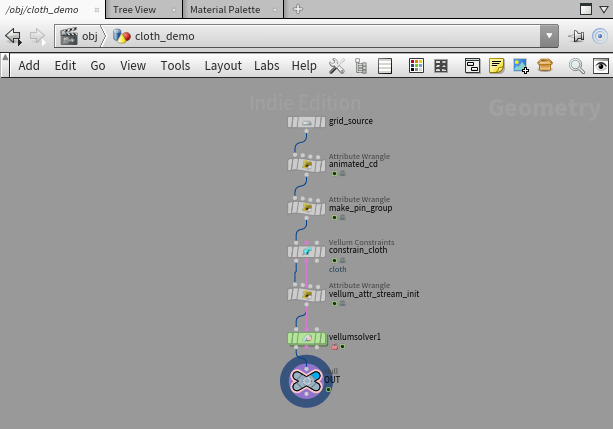
Checkpoint: Scrub the timeline. The Vellum Constraints node’s
Cdattribute changes every frame in the geometry spreadsheet, but if you scrub the OUT node’sCdit stays stuck at frame-1 values. That is the bug this plugin fixes.
Step 3: Attach the Streamer (Run Script)
Select the Vellum Solver SOP, then go to File > Run Script… and pick vellum_attr_stream_setup.cmd. The .cmd dispatches to the sibling .py, which auto-installs the .hda from the same folder, then inserts two nodes:
vellum_attr_stream_setup— a DOP node placed inside the solver, wired into the popsolver’s Pre-Solve microsolver chain. This is the worker that runs every substep.vellum_attr_stream_init— a SOP attribute wrangle inserted upstream of the Vellum Solver. Its job is to seed frame 1, because microsolvers do not run on the creation frame in Houdini.
Diving inside vellumsolver1 > dopnet1 > vellumsolver1 shows the streamer DOP attached to merge7, which feeds the Pre-Solve input of the popsolver:
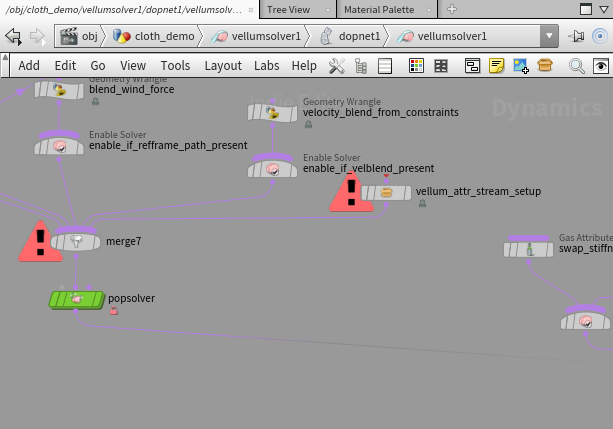
Checkpoint: Re-running the script on the same Vellum Solver is a no-op — it detects the existing setup and selects the streamer DOP instead of duplicating it.
If you’d rather build it by hand: unlock the Vellum Solver SOP, dive to dopnet1/vellumsolver1/popsolver, drop a Vellum Attr Stream DOP, and wire it into a free input of the merge feeding the popsolver’s Pre-Solve. Then insert an Attribute Wrangle upstream of the Vellum Solver SOP using the VEX from the HDA’s init_vex section.
Step 4: Configure the Streamer
Select the inserted vellum_attr_stream_setup DOP. Three parameters control the stream:
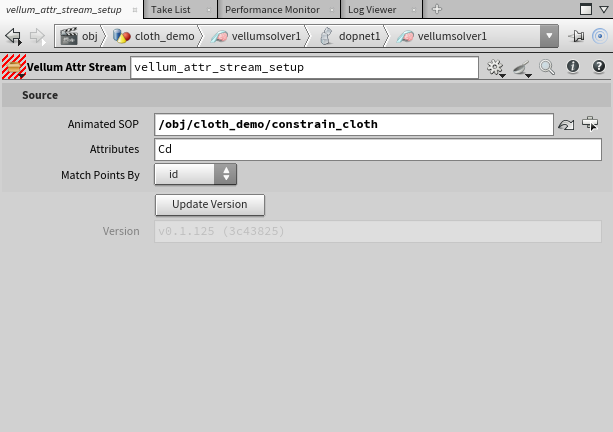
| Parameter | Default | What it controls |
|---|---|---|
| Animated SOP | (auto-filled) | Path to the upstream SOP that produces the time-varying attribute. The setup script pre-fills this from the Vellum Solver’s input. |
| Attributes | Cd |
Space-separated list of point attribute names to copy. Float scalar / vector / vector4 and integer scalar are supported. |
| Match Points By | id | id matches points by the id point attribute (survives upstream topology shuffles). ptnum matches by point number — only safe when both geometries have identical point order. |
The SOP-level vellum_attr_stream_init wrangle reads its parameters from the streamer DOP via channel references. Edit them in one place (the streamer); both stay in sync.
Step 5: Verify the Sim is Updating Per Frame
Play frames 1 through 60. The cloth drapes under gravity and the bright band sweeps across its surface, tracking the upstream SOP every substep:
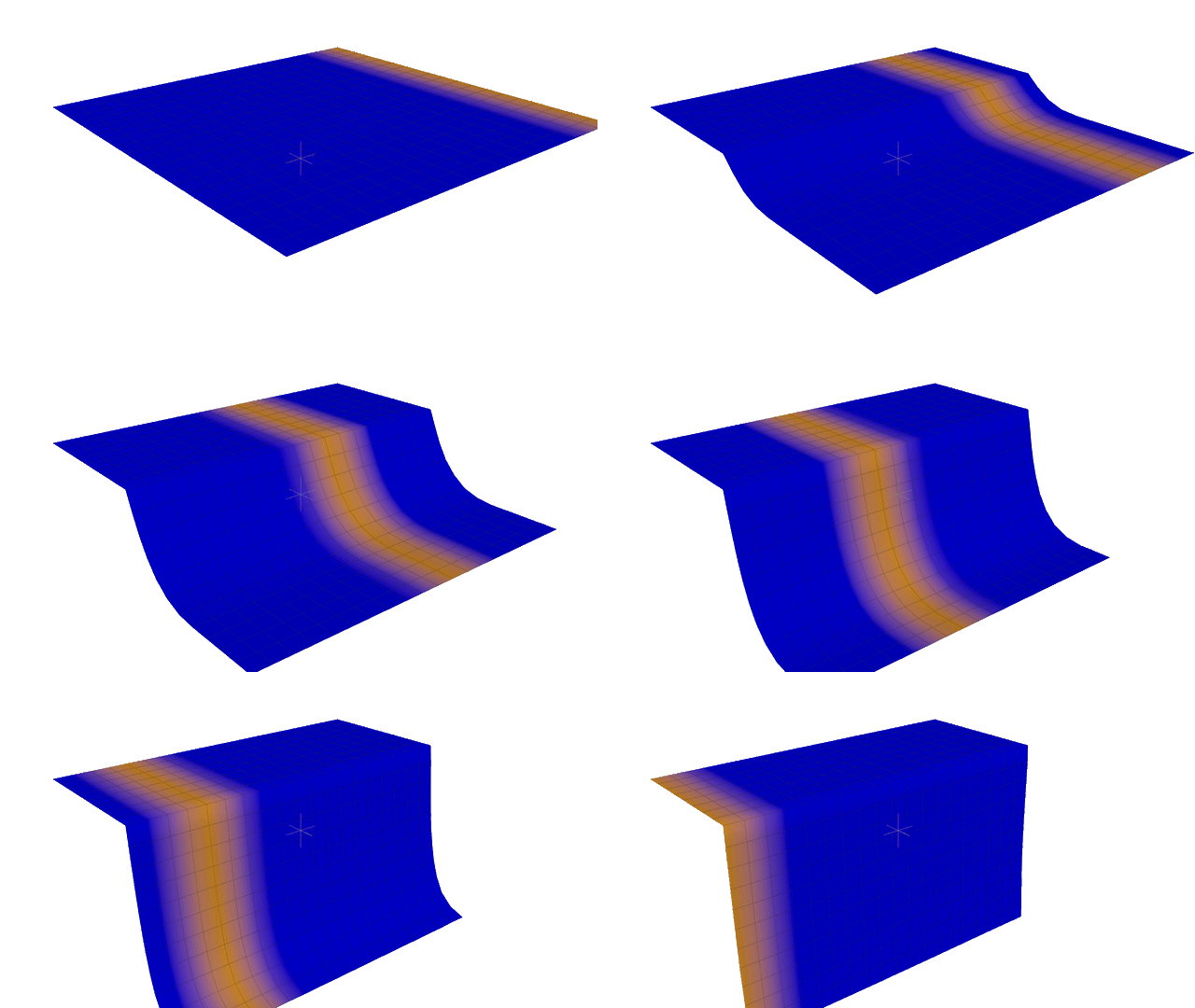
To confirm the streamer is actually doing the work, bypass both vellum_attr_stream_setup (inside the solver) and vellum_attr_stream_init (at the SOP level), then re-cook from frame 1. The cloth still drapes correctly, but the band is locked to its frame-1 position and stays put for the entire sim:
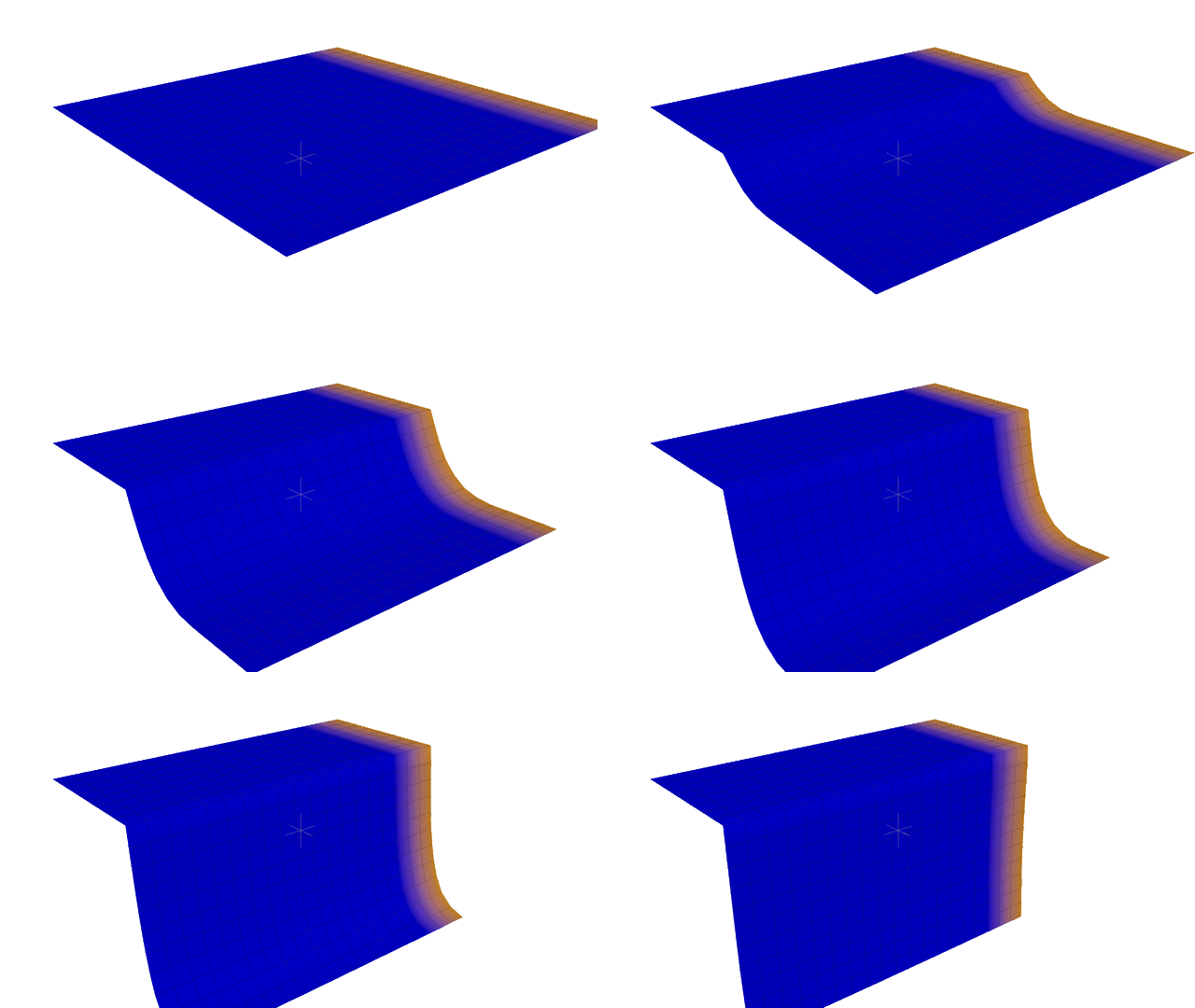
Checkpoint: With the streamer active, the band sweeps across the cloth as the timeline advances. With the streamer bypassed, the band is frozen at whatever world-X position it occupied on frame 1 — a clean visual proof that Vellum reads SOP attributes once and never again, until the streamer puts them back into play.
Result
A single File > Run Script action adds a streamer that pushes any SOP point attribute into a live Vellum simulation every substep. The attribute list is editable per-shot, the match mode is configurable, and the SOP-level init wrangle handles the frame-1 case so the very first cooked frame already reflects the source.
Troubleshooting
| Symptom | Likely Cause | Fix |
|---|---|---|
| Setup reports “Can’t find vellum_attr_stream.hda next to this script” | The .cmd, .py, and .hda are not in the same folder | Move all three files into one folder; the .cmd resolves siblings via its own path |
| Setup reports “Couldn’t read ‘init_vex’ section” | The .hda is from an older build that pre-dates init-wrangle support | Re-download the latest vellum_attr_stream.hda, or rebuild from source with hython build_vellum_attr_stream.py |
Cd does not update on the simulated cloth |
The streamer is bypassed, or the Animated SOP path is wrong | Re-enable the streamer; click the parameter’s chooser and pick the upstream SOP that actually animates Cd |
| Vellum Solver errors with “Duplicate point id attributes detected” | Cloth points lack an id attribute, or it has been added twice |
Make sure you set i@id = @ptnum; once on the cloth geometry, before Vellum Constraints |
| Frame 1 shows stale colors but every later frame is correct | The SOP-level init wrangle is bypassed | Un-bypass vellum_attr_stream_init — microsolvers do not run on the creation frame, so the SOP wrangle is what seeds f1 |
| Some attributes update but others do not | The attribute does not exist on the upstream SOP at the time the substep cooks, or it is not a supported type (only float scalar/vec/vec4 and integer scalar) | Verify the attribute exists on the Animated SOP in the geometry spreadsheet |
Building from Source
If you need an HDA compiled under your own Houdini license (to avoid the Indie / Apprentice flag):
- Download
build_vellum_attr_stream.py. - Run:
hython build_vellum_attr_stream.pyOr with a full path:
/opt/hfs21.0/bin/hython build_vellum_attr_stream.py - The script writes
vellum_attr_stream.hdanext to itself. The .cmd and .py never need rebuilding.
Notes
- Why this is needed. Vellum’s solver reads SOP attributes once, when the simulation initialises. After that, the sim runs in the DOP context and has no automatic link back to the SOP that produced the cloth. Animated values painted upstream are silently dropped from frame 2 onward. The streamer fixes this by sampling the upstream SOP via VEX
op:reference each substep and writing the listed attributes onto the live sim points. - Why a microsolver. Putting the streamer inside the popsolver’s Pre-Solve chain is the same pattern SideFX uses internally for
muscleupdatevellum. Microsolvers run every substep, which is exactly the cadence needed for time-varying attributes. - Why a SOP-level init wrangle. Microsolvers do not execute on the creation frame in Houdini. Without the upstream wrangle, frame 1 of the simulation would always show whatever was on the geometry the very first time it was cooked into the solver — usually correct, but easy to break by re-cooking out of order. The init wrangle makes frame 1 deterministic.
- Supported attribute types. Float scalar, vector (3), vector4 (4), and integer scalar. Strings and matrices are out of scope; primitive and vertex attributes are out of scope (point-to-point matching is the common case the plugin targets).
- License. The pre-built HDA was compiled under Houdini Indie. Loading it in a full FX session flags the scene as limited-commercial. Build from source to avoid this.